


.jpeg)
Recruiterflow is one of the more automation-forward ATS platforms built specifically for recruiting agencies. The AI-driven workflows, sequencing, and pipeline tools are well-designed for the way search and staffing firms operate. Where it shares a limitation with most ATS platforms is interview scheduling - specifically the coordination between external candidates and external clients, which remains largely manual.
Here's what Recruiterflow's native scheduling covers, where the gap is, and how agencies are handling it.
What Recruiterflow's native scheduling does
Recruiterflow includes calendar sync, the ability to schedule events and interviews from within the platform, and integration hooks that let you connect third-party scheduling tools. The platform has a strong automation engine - you can trigger emails, reminders, and stage updates based on pipeline movement, which covers a lot of the coordination overhead that comes with managing candidates at scale.
For scheduling internal activities - calls between recruiters and candidates, reminder sequences, status updates - Recruiterflow handles this well. The platform is designed to reduce manual admin, and it does that effectively across most of the recruiting workflow.
Where it falls short for external agencies
The gap is the client side. Recruiterflow's scheduling is oriented around the recruiter and candidate relationship. For coordinating an actual interview between a candidate and a hiring manager at a client company - where you need to collect availability from one external party and confirm with another - there's no native workflow that handles that.
What most Recruiterflow users end up doing is using the platform for candidate management and then handling client-side scheduling separately: emailing the client for available times, cross-referencing with the candidate, confirming, and then logging everything back in Recruiterflow manually. The automation handles the candidate communication well. The client coordination is still largely email-based and manual.
Recruiterflow's own blog acknowledges this - they recommend connecting a third-party scheduling tool for interview coordination, since the native features are stronger on the candidate engagement side than on the multi-party coordination side.
How to schedule interviews in Recruiterflow using Arrange
Arrange integrates natively with Recruiterflow and handles the coordination gap directly. You create a scheduling link in Arrange, tag it to the relevant job in Recruiterflow, and send it as part of your normal submittal or follow-up process. The three-party coordination happens automatically from there.
The scheduling flows give you control over how you run the process. Candidate First collects the candidate's availability and lets you share a filtered set with your client to confirm. Client First pulls the client's open times and gives the candidate a booking link. Matchmaker sends to both sides simultaneously and auto-confirms the first overlap - useful when you want to move quickly and don't want to run two separate rounds.
Neither the candidate nor the client needs to log in to anything. They interact through a link, make their selection, and the interview is confirmed. When it confirms, Recruiterflow updates automatically - the candidate's stage advances and the interview details are logged without any manual entry on your end.
Arrange Connect extends this further for established client relationships. Clients can connect their calendar through a permission link, and candidates book directly against real availability. No accounts required.
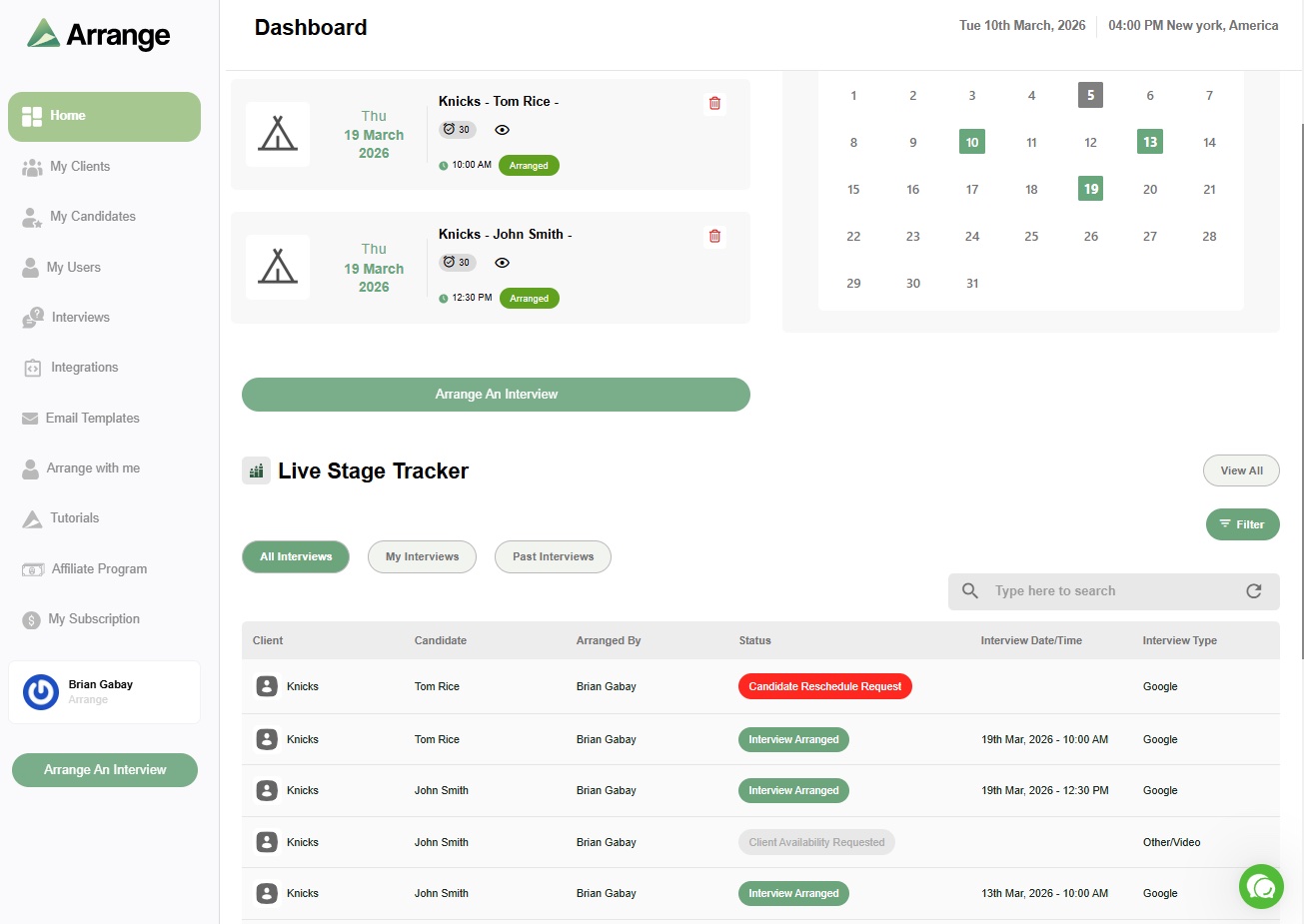
The live stage tracker gives you a real-time view of where every interview stands across all your active roles. You can see who's submitted availability, who's waiting, and what's already confirmed - without having to chase anyone for an update.
Why this matters for Recruiterflow users
Recruiterflow already automates a significant portion of the recruiting workflow. Adding Arrange fills in the specific piece it wasn't designed to cover - the external three-party coordination between you, your candidate, and your client - and closes the loop back into Recruiterflow automatically when the interview is confirmed.
The combination means your ATS stays accurate without manual updates, and the most time-consuming part of interview scheduling - the back-and-forth with two external parties who don't share a calendar - runs without you having to manage it manually.
For more on how this kind of integration works, see what interview scheduling platform integrates with ATS systems. And for a broader look at why ATS scheduling alone isn't enough for agency recruiters, your ATS has scheduling - here's why that's not enough covers the full picture. If you're also comparing how this works in other agency-focused ATS platforms, see how to schedule interviews in Crelate.
Frequently asked questions
Does Recruiterflow have interview scheduling built in?
Recruiterflow has calendar sync and can trigger scheduling-related communications through its automation engine. It doesn't have a native workflow for coordinating availability between external candidates and external clients - that coordination is still largely manual. Recruiterflow itself recommends connecting a third-party scheduling tool for multi-party interview coordination.
How does Arrange integrate with Recruiterflow?
When an interview is confirmed through Arrange, Recruiterflow updates automatically - the candidate's stage advances and the interview details are logged without manual input. You tag the scheduling link to a specific job in Recruiterflow when you create it in Arrange, and the integration handles the rest.
Can I use Arrange alongside Recruiterflow's existing automation?
Yes. Arrange handles the external coordination piece that Recruiterflow's automation doesn't cover. Your existing Recruiterflow workflows for candidate communication, reminders, and stage management continue to run as normal. Arrange feeds the confirmed interview outcome back into Recruiterflow automatically.


.jpg)

.jpg)
.jpg)