


.jpeg)
Loxo is built for recruiting agencies. The sourcing, outreach, and pipeline management tools are genuinely well-suited to the way external recruiters work. Scheduling, though, is where the platform runs into the same wall as every other ATS - it was designed around internal hiring, not the three-party coordination problem that agency recruiters deal with every day.
Here's what Loxo's native scheduling actually does, where it falls short for agencies, and how recruiters are solving it.
What Loxo's native scheduling does
Loxo includes calendar sync and the ability to trigger scheduling activity based on pipeline stage movement. When a candidate advances to an interview stage, Loxo can fire automated communications and log the activity. The platform also has a hiring manager portal where clients can view submitted candidates and leave feedback.
For internal teams or RPO operations where recruiters have direct access to hiring manager calendars, this works reasonably well. You can coordinate within the platform, keep everything logged in the candidate record, and move people through the pipeline without switching tools.
Where it falls short for external agencies
External agencies work differently. You don't have access to your client's calendar. Your clients aren't inside Loxo. And when it comes to actually coordinating an interview - collecting availability from a candidate, sharing it with a hiring manager, and confirming a time - Loxo doesn't have a workflow for that.
What you're left with is the usual manual process: email the candidate to get their availability, forward it to the client, wait for the client to respond, confirm with the candidate, and then log it all back in Loxo by hand. The ATS records the outcome, but it doesn't help you get there.
This is the core gap. Loxo is excellent at tracking what happened. It's not built to coordinate the scheduling itself between two external parties who aren't in the same system.
If you're running multiple active searches at once - which most agency recruiters are - this adds up fast. Each interview requires the same manual back-and-forth, and nothing in Loxo tells you where each one stands until someone manually updates the record.
How to schedule interviews in Loxo using Arrange
Arrange integrates natively with Loxo and fills exactly this gap. When you're ready to schedule an interview, you create a scheduling link inside Arrange and tag it to the relevant job in Loxo. From there, the coordination happens automatically.
The core scheduling flows give you flexibility depending on how you want to run the process. With Candidate First, you send the candidate an availability request, collect their open times, and share a filtered set with your client to confirm. With Client First, you pull your client's availability first and give the candidate a booking link to select from. The Matchmaker flow collects availability from both sides simultaneously and auto-confirms the first overlap.
Neither the candidate nor the client needs to log in to anything. They receive a link, share their availability or select a time, and the interview gets confirmed. When it does, Loxo updates automatically - the candidate's stage advances and the interview details are logged without any manual input.
Arrange Connect adds another layer for clients you have a strong relationship with. You can request read-only calendar access through a permission link, and candidates can book directly against real availability. No accounts required on either side.
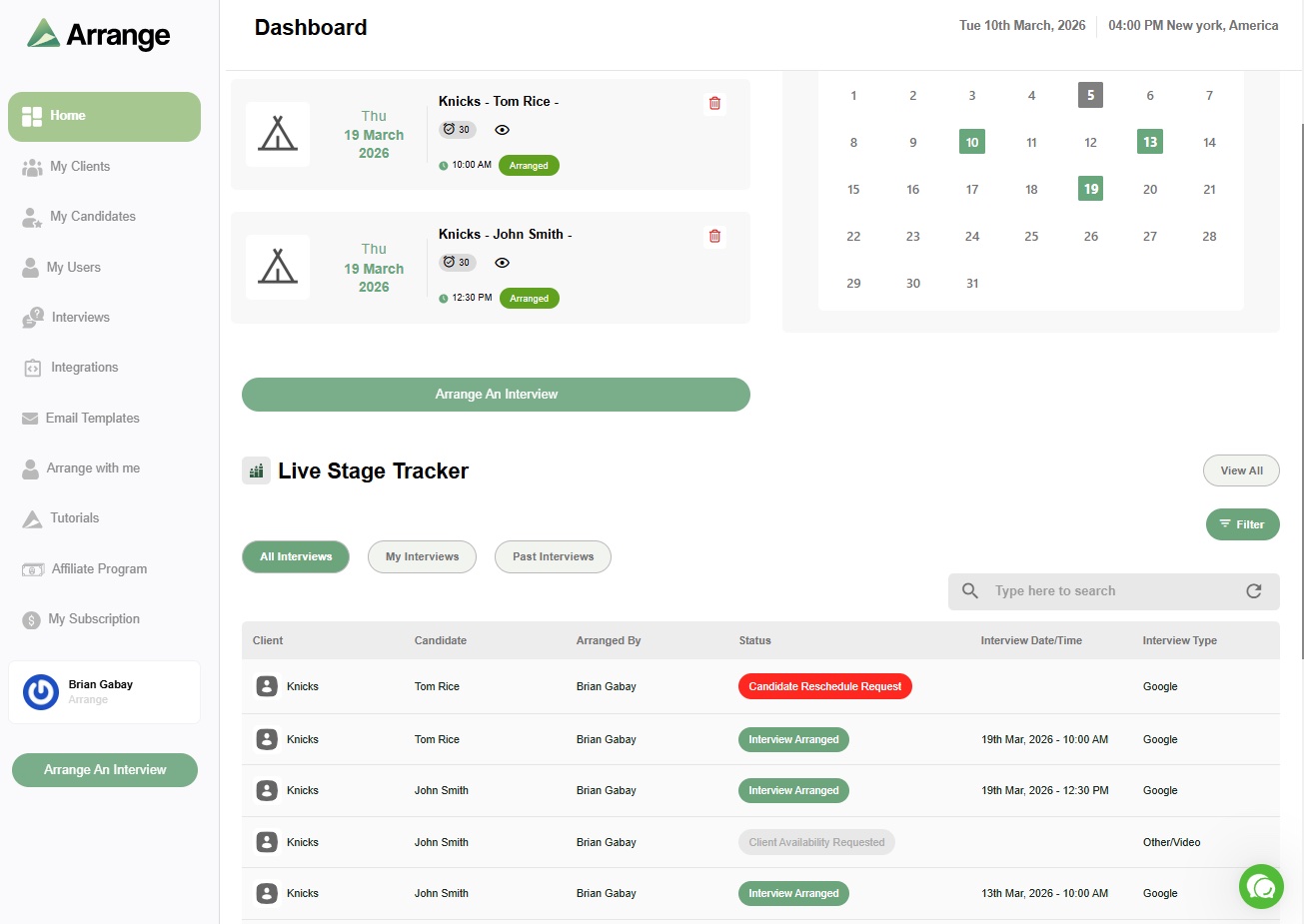
The live stage tracker in Arrange gives you visibility across all your active interviews - whether availability has been submitted, who's waiting on a response, and which ones are confirmed. You're not finding out something fell through after the fact.
Why this matters for Loxo users specifically
If you're already using Loxo, you're not looking to replace it. The ATS and CRM are doing their job. What the Arrange integration does is close the loop on the part of the workflow Loxo doesn't cover - the actual coordination between candidates and clients - and feed the confirmed outcome back into Loxo automatically.
The result is a clean record in Loxo without the manual logging, and a scheduling process that doesn't require 14 emails to get an interview on the calendar.
For more on how ATS integrations work for scheduling, see what interview scheduling platform integrates with ATS systems. And if you're thinking about whether your ATS scheduling is enough on its own, your ATS has scheduling - here's why that's not enough breaks down the gap in more detail.
Frequently asked questions
Does Loxo have built-in interview scheduling?
Loxo has calendar sync and can trigger scheduling-related actions when candidates move through pipeline stages. What it doesn't have is a workflow for coordinating availability between external candidates and external clients - the core problem for agency recruiters. That coordination still happens manually unless you connect a dedicated scheduling tool.
How does Arrange integrate with Loxo?
When you create a scheduling link in Arrange and tag it to a job in Loxo, confirmed interviews automatically advance the candidate's stage and log the interview details in Loxo. No manual updating required. The integration works in the background while you run the scheduling process through Arrange.
Do candidates or clients need to log in to use Arrange with Loxo?
No. Candidates and clients interact through scheduling links with no account required. They share their availability or confirm a time through the link, and the outcome syncs back to Loxo automatically.


.jpg)

.jpg)
.jpg)