


Yes, and plenty of recruiting teams do exactly that. A spreadsheet can track interview stages - candidate name, client, current stage, last updated, next action. It's a familiar format and it's free.
The question is whether tracking stages is the same as managing them. For most agencies, it isn't.

What tracking interview stages in a spreadsheet looks like
A typical setup: one tab per client, rows for each active candidate, columns for submission date, interview stage, availability requested, availability received, interview confirmed, and notes. Someone updates it manually after each action or exchange.
It gives you a view of where things stand - or more accurately, where things stood the last time someone updated it.
Where it breaks down for recruiting agencies
The spreadsheet is only as current as the last manual update. In a fast-moving recruiting workflow, that lag creates problems.
It's always out of date
If a candidate responded to your availability request at 3pm and you're in client calls until 5pm, your spreadsheet shows 'waiting on candidate' until you manually update it. Meanwhile, you might follow up unnecessarily or miss that the candidate responded with urgent availability that needs to be acted on quickly.
It doesn't tell you what's happening right now
Knowing a candidate is 'in scheduling' doesn't tell you whether the scheduling is moving. Is the client responding slowly? Has the candidate gone quiet? Is there a time-sensitive window closing? The spreadsheet can't answer any of those questions - it just reflects the stage you last typed in.
It doesn't connect to your scheduling workflow
The actual coordination - sending availability requests, collecting responses, sending calendar invites - happens in email and calendar tools that aren't connected to the spreadsheet. The spreadsheet is a separate system that someone has to update manually after each step. That's a discipline problem as much as a tool problem, and discipline degrades when volume increases.
It breaks down across multiple clients
Managing interviews across five clients means maintaining five mental models of where things stand, plus one spreadsheet trying to capture all of them. At low volume this works. At higher volume, the spreadsheet becomes harder to trust and harder to act on.
It doesn't scale with your team
When more recruiters are working in parallel, the spreadsheet becomes a shared document that everyone needs to update in sync. Merge conflicts, stale data, and missing entries compound quickly.
The bottom line
A spreadsheet tracks stages. It doesn't manage them. The difference is whether the tool participates in the process or just records it.
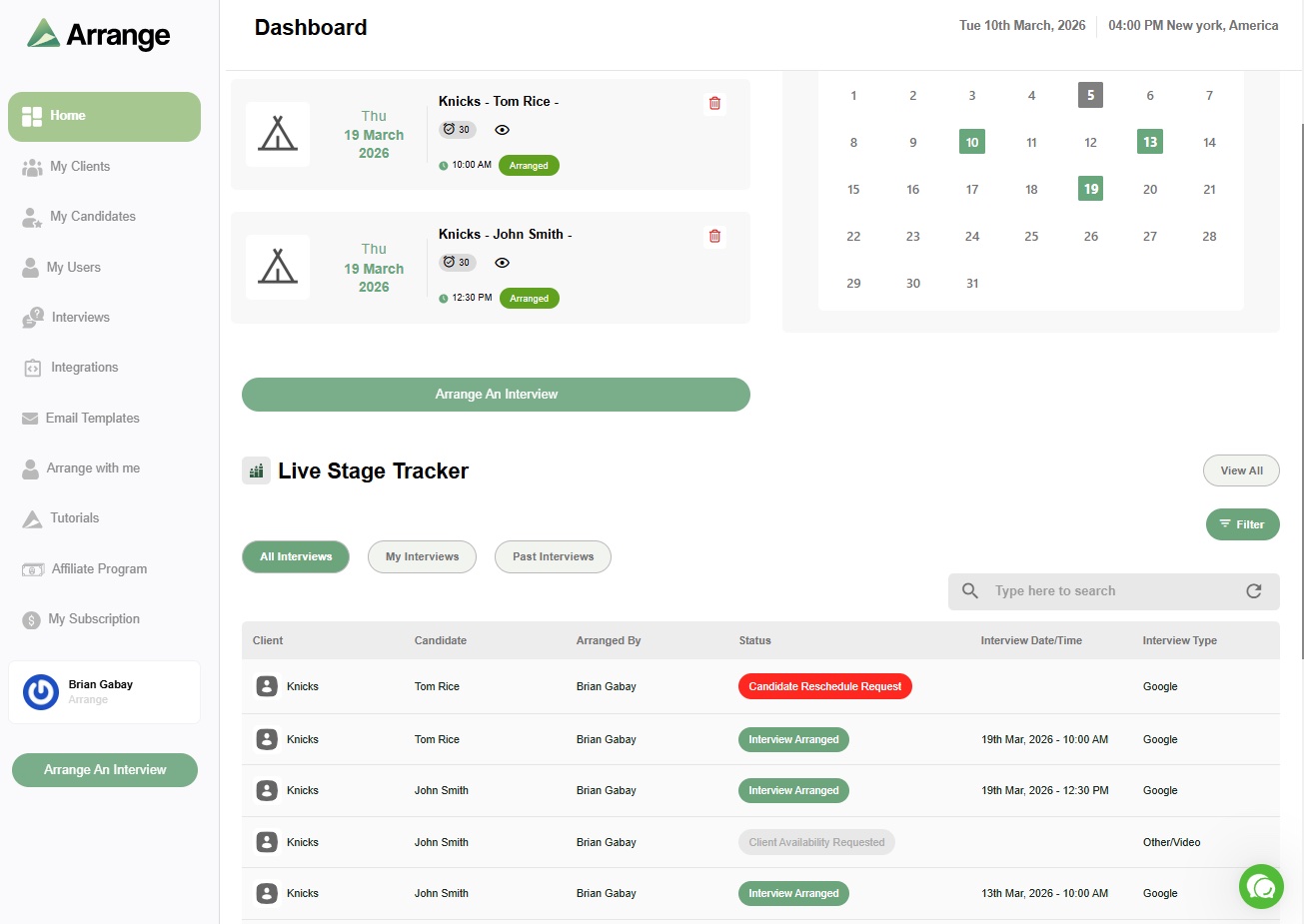
Arrange gives agencies a live stage tracker that updates automatically as candidates and clients interact with scheduling links - no manual updates required. Every stage change is reflected in real time, and the recruiter can see at a glance what's moving, what's stalled, and what needs attention.
There's a 14-day free trial at letsarrange.io.


.jpg)

.jpg)
.jpg)