


Most applicant tracking systems have some form of interview scheduling built in. It's usually listed as a feature, it shows up in demos, and it sounds like it should cover your needs. The reality is more complicated.
Built-in ATS scheduling tends to work well for simple scenarios - sending a candidate a time, syncing to a calendar, logging the activity. Where it falls short is the coordination layer: collecting availability from multiple parties, managing back-and-forth across organizational boundaries, and doing all of it without requiring candidates or clients to log into your system.
This article breaks down the scheduling capabilities of the most widely used ATS platforms in 2026, what each one actually does well, and where the gaps are. At the end, there's a straightforward recommendation on how most recruiting teams should think about their scheduling stack.
What good ATS scheduling looks like
Before getting into individual platforms, it helps to be clear about what ATS scheduling typically covers and what it doesn't.
Most ATS scheduling features handle the basics: sending interview invites, syncing with Google Calendar or Outlook, automating confirmation emails, and logging the activity in the candidate record. For internal TA teams coordinating within a single organization, that covers a lot of ground.
Where ATS scheduling consistently falls short:
- Collecting availability from external parties (clients, hiring managers outside your org) without requiring them to log in
- Three-party coordination where you need to gather times from one party and share a filtered set with another
- White-labeled scheduling experiences for external-facing agencies
- Flexible multi-step flows built around how external recruiters actually work
Those gaps matter more or less depending on your use case. Here's how the main ATS platforms stack up.
ATS platforms with the strongest scheduling capabilities
Greenhouse
Greenhouse is one of the most widely used ATS platforms for structured hiring at mid-to-large companies. Its scheduling functionality is solid for internal teams - you can send interview invites directly from the platform, sync with Google Calendar and Outlook, and use interview kits and scorecards to keep evaluations consistent. The candidate-facing experience is clean, and the overall workflow is well-integrated with the rest of the Greenhouse pipeline.
For teams doing panel scheduling across multiple interviewers, Greenhouse connects with tools like GoodTime and ModernLoop to handle the more complex coordination. The native scheduling is good enough for straightforward interviews; for high-volume panel scheduling, most teams add a dedicated scheduling tool on top.
For external recruiting agencies, Greenhouse is primarily an ATS for their clients, not something they're operating themselves. The scheduling features are built for the internal team, not for external coordinators managing candidates across multiple client companies.
Lever

Lever combines ATS and CRM functionality with built-in scheduling features. Like Greenhouse, it integrates with Google Calendar and Outlook and allows recruiters to send scheduling links directly from the platform. The candidate experience is polished, and the pipeline visibility is strong.
Lever's scheduling is designed for the same internal-team use case as Greenhouse - teams where the recruiter has visibility into hiring manager calendars and the candidates are the only external party. For that use case, it handles the basics well without requiring a separate scheduling tool for most workflows.
The same limitations apply for external agencies: Lever's scheduling wasn't designed for coordinating between an external candidate and an external client across organizational lines.
Bullhorn

Bullhorn is widely used in the staffing industry and is one of the few ATS platforms built with agency recruiters in mind from the start. The scheduling functionality within Bullhorn is functional but not a primary strength - most Bullhorn users handle scheduling coordination outside the platform, using email or supplementary tools, then log the outcome back into Bullhorn manually.
Bullhorn's value is in its CRM depth, its submission and placement tracking, and its integrations with staffing-specific tools. For pure scheduling automation, most Bullhorn users are looking for something they can connect to Bullhorn rather than expecting Bullhorn's native scheduling to carry that weight.
Loxo

Loxo is an all-in-one talent intelligence platform that has become popular with agency recruiters and executive search firms. It includes scheduling functionality as part of its broader feature set, with calendar integration and activity logging built in.
Like most ATS scheduling features, Loxo's works well for tracking and logging interview activity. For the actual coordination - getting availability from a candidate and presenting options to a client - most Loxo users still handle that manually or through a dedicated scheduling integration. Loxo integrates with Arrange, which handles the external coordination layer and pushes confirmed interview data back to Loxo automatically.
Recruiterflow

Recruiterflow is built specifically for recruiting agencies and includes scheduling functionality as part of its pipeline management tools. It handles basic interview coordination and has clean integrations with calendar tools. For agencies looking for an ATS with decent built-in scheduling for simpler workflows, Recruiterflow covers that ground.
For more complex external coordination - managing availability across candidates and clients who have no shared system - Recruiterflow integrates with Arrange to handle the automated coordination layer, with confirmed interviews syncing back to the ATS automatically.
Workable
Workable is a full HR platform that includes ATS and scheduling features targeted at small-to-mid-sized in-house hiring teams. Its scheduling features are clean and accessible - self-scheduling links for candidates, automated reminders, and calendar integration. For internal teams hiring at moderate volume, it's a solid all-in-one option that doesn't require bolting on separate tools for most workflows.
For agency recruiters, Workable's scheduling runs into the same fundamental limitation as most ATS scheduling: it's built for teams where the hiring manager is internal and calendar access is available. External client coordination isn't the use case it was designed for.
So should you use your ATS for scheduling?
For most in-house teams, the answer is: yes, for straightforward workflows, and add a dedicated tool if you're running high-volume panel scheduling at scale. Greenhouse and Lever handle the basics well. Workable handles it well for smaller teams. Bullhorn is the exception - most Bullhorn users are already looking outside the platform for scheduling.
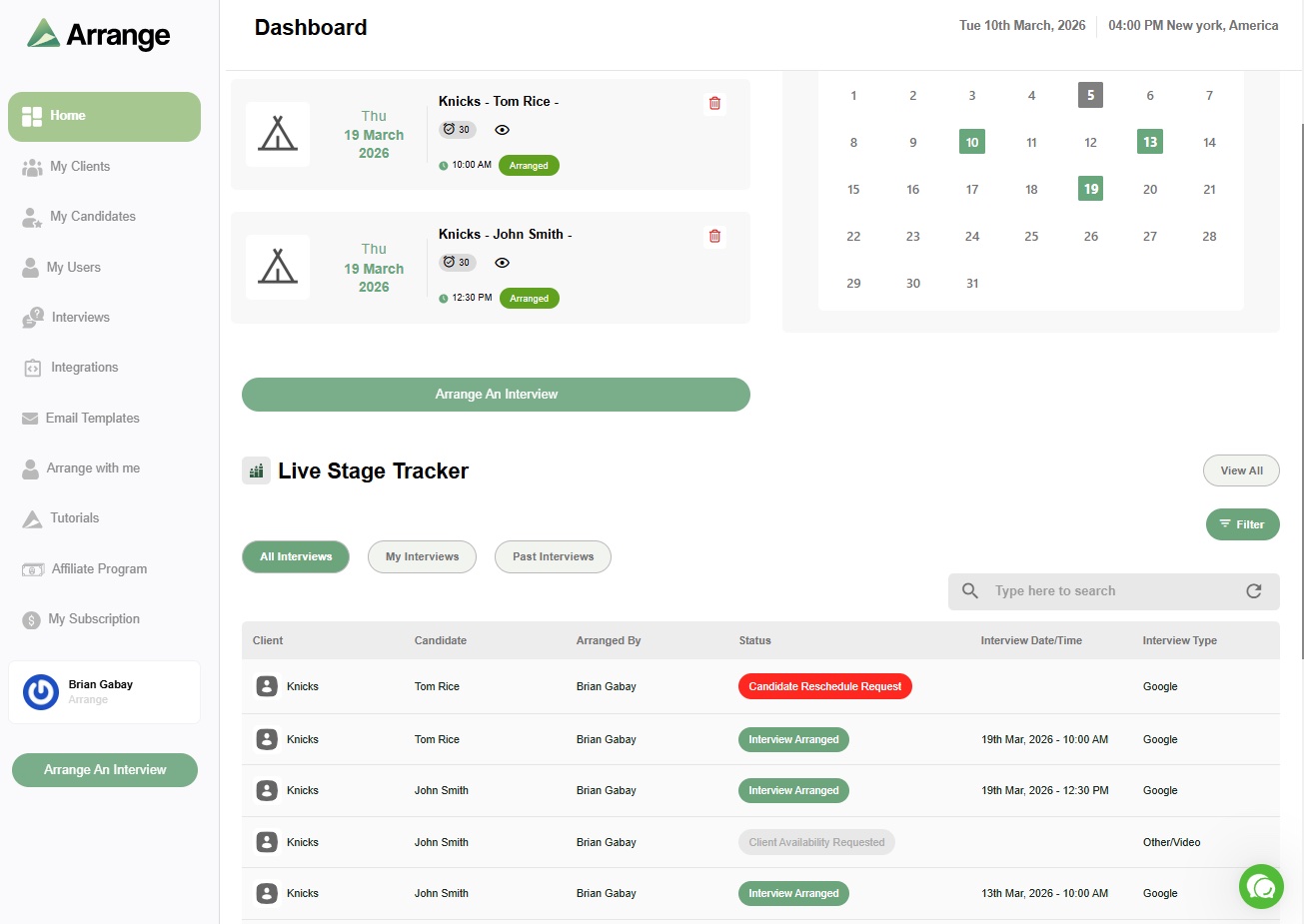
For agency recruiters, the answer is more nuanced. Your ATS is the right place to track interview activity and manage your pipeline. But the actual coordination - getting availability from an external candidate, sharing filtered options with an external client, confirming the interview without anyone needing to log in - that's a different problem than what ATS scheduling was built to solve.
The teams that have the smoothest scheduling workflows are usually running their ATS for what it does best, and using a dedicated scheduling tool for the coordination layer. When those two things are connected properly, the recruiter triggers the process once and the ATS reflects the outcome automatically. Arrange is built for exactly that - purpose-built for agency recruiters, integrating natively with Loxo, Crelate, Recruiterflow, and RecruitCRM.
Frequently asked questions
Does Greenhouse have interview scheduling?
Yes. Greenhouse includes native interview scheduling with calendar integration, scheduling links, and automatic stage advancement. For in-house teams with access to hiring manager calendars, it handles straightforward scheduling well. For complex panel scheduling at scale, most Greenhouse users add a dedicated tool like GoodTime or ModernLoop.
What ATS is best for recruiting agencies?
Loxo, Crelate, Recruiterflow, and RecruitCRM are among the most widely used ATS platforms by external recruiting agencies. Each has built-in scheduling features for tracking and logging, but external coordination - managing availability between candidates and external clients - typically requires a dedicated scheduling integration. Arrange integrates natively with all four.
Should I use my ATS for interview scheduling or a separate tool?
For simple workflows where you're scheduling between internal parties with shared calendar access, your ATS scheduling is often sufficient. For external coordination - where candidates and clients have no shared system and you need to collect availability from both sides without requiring logins - a dedicated scheduling tool that integrates with your ATS will save significant time. The two work best together: ATS for pipeline management, dedicated tool for coordination.


.jpg)

.jpg)
.jpg)